Making Objective-C Land More Habitable
Over these past few months, I have been working on a long-term class project using OS X technologies in both Objective-C and Javascript. Overall, the experience was pretty good (except for the Javascript part) -- and I suspect much easier compared to having to use Java. Using Java would require us to hunt down various libraries and then filter through them since there are probably 10++ different libraries for each thing that we need to do. So using OS X was a good choice.
However, there are a few tools that I wished I had known earlier....
GHUnit
Unit testing using Cocoa is pretty complicated. In fact, it's unnecessarily more complicated than Java, Ruby or Smalltalk. It's only less complicated than unit testing C++ (which doesn't say much)! There are two things that particularly irk me:
- Not seeing green/red! - You have to actually read the text in the build log to see which of your tests pass and fail. This is completely ridiculous - it's so easy to miss a failing test case because of this. Anyone who has used the Xunit testing framework family is accustomed to seeing green for passing tests and red for failing tests.
- Not being able to debug your unit tests - You have to perform some boilerplate steps on your own. Such steps should be automated for you!
Fortunately, GHUNit comes along. And at least solves those two problems. It has become my choice for unit testing in Cocoa and all my future projects will use it. It's released under a very liberal open source license so using it in your own project shouldn't be a problem. Apple and the Xcode team should integrate this directly into Xcode.

GHUnit in action
F-Script
The cocoa libraries are nice. But sometimes the documentation can be a bit confusing. So, the best way to find out what a method or class does it to write some code for it and try it out. But honestly, would you like writing a small program each time to try a method or class out?
That's when you need F-Script which allows you to call run Objective-C like you would run a scripting language. Need to find out how that NSString method behaves? Just type in into the F-Script REPL workspace. You can even play around with Core Image easily in the F-Script workspace!

F-Script shell in action
But wait! F-Script has even more to offer. Using F-Script Anywhere allows you to inject the F-Script environment into any Cocoa application. That way you can quickly figure out and play around with other people's application!
The only thing you need to do is spend about 20 minutes learning the F-Script syntax which is very similar to Smalltalk's - so it only took me about 5 minutes.
Clang Static Analyzer
One area where Java really shines is the abundance of high-quality tools for static analysis. Using these tools allow you to avoid a lot of silly mistakes before you even compile or run your Java code.
Previously, Objective-C was definitely lacking in this area. However, the Clang Static Analyzer hopes to change that. In fact, if you are using the latest version of Xcode under Snow Leopard, it should be integrated already. Here's the static analyzer in action:
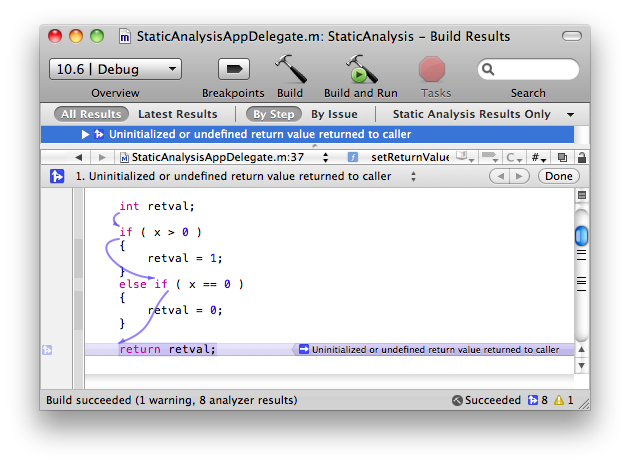
Uninitialized Variable Error
For our particular project, we needed to use OS X Leopard so followed these steps to get the static analyzer to work. Even though it took a few more steps, the extra trouble is worth it since it catches a lot of garbage collection issues that we might have missed otherwise.
The Clang Static Analyzer is based on the LLVM compiler infrastructure developed here the University of Illinois at Urbana-Champaign.
BWToolkit
Interface Builder is awesome. It definitely beats any other interface builder that I have tried. However, it can be too basic at times. It works very well, if you are doing a simple UI. But it lacks the palettes for some of the more advanced (but pretty commonplace) UI that you see in Mail.app, iCal.app, etc.
That's when BWToolkit comes in. It offers a plethora of different palettes which makes designing your UI extremely easy. And you can use all of them using drag-and-drop from Interface Builder.
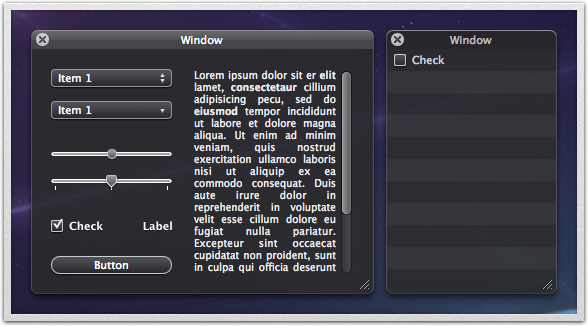
BWToolkit's suite of controls for HUD windows
It's released under the liberal BSD license so you don't need to worry about using it for your projects. GHUnit itself uses it and that's actually how I discovered this wonderful toolkit.
Overall, OS X has a lot to offer in both libraries and tools. And when it falls short, some other developer out there is usually passionate enough to create and share their tools with you. It just takes too long sometimes to find those tools. So hopefully, this list will be useful to some other aspiring OS X developer. Tweet
comments powered by Disqus